
IaaS PaaS SaaS in Cloud Computing Explained

IaaS PaaS SaaS in Cloud Computing Explained
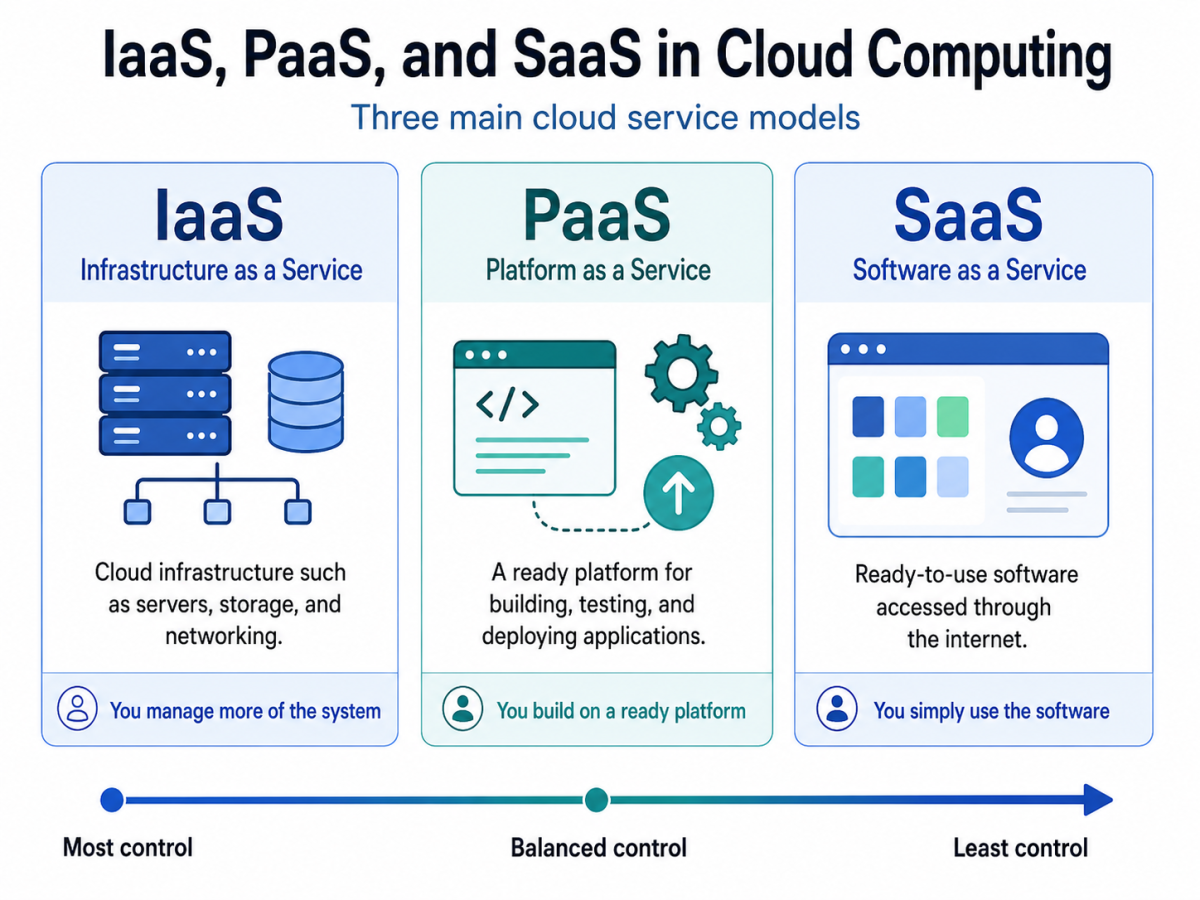
IaaS PaaS SaaS in cloud computing are the three main cloud service models. They explain how much of the technology stack is handled by the cloud provider and how much is managed by the customer.
In simple terms, IaaS gives access to cloud infrastructure, PaaS gives developers a platform to build applications, and SaaS gives users ready-to-use software. These models are important for cloud learners because they appear often in AWS Cloud Practitioner, Azure Fundamentals, and Cloud+ preparation.
Once these models are clear, cloud computing becomes much easier to understand. Learners can see what a cloud provider manages, what the customer manages, and why different businesses choose different cloud service models.
What Are IaaS, PaaS, and SaaS?
IaaS, PaaS, and SaaS are cloud computing service models. A cloud service model explains what type of cloud resource is delivered to the customer.
Instead of buying and maintaining every part of a physical data centre, businesses can use cloud computing to access infrastructure, platforms, and software over the internet. This reduces the need to manage all technology resources in-house.
In simple terms:
- IaaS gives access to cloud computing infrastructure.
- PaaS gives developers a platform to build and deploy applications.
- SaaS gives users software they can access through a browser or app.
This matters because each cloud service model gives a different level of control, flexibility, and responsibility.
What Is IaaS?
IaaS stands for Infrastructure as a Service. It gives businesses access to basic computing resources such as virtual machines, storage, networking, and servers through the cloud.
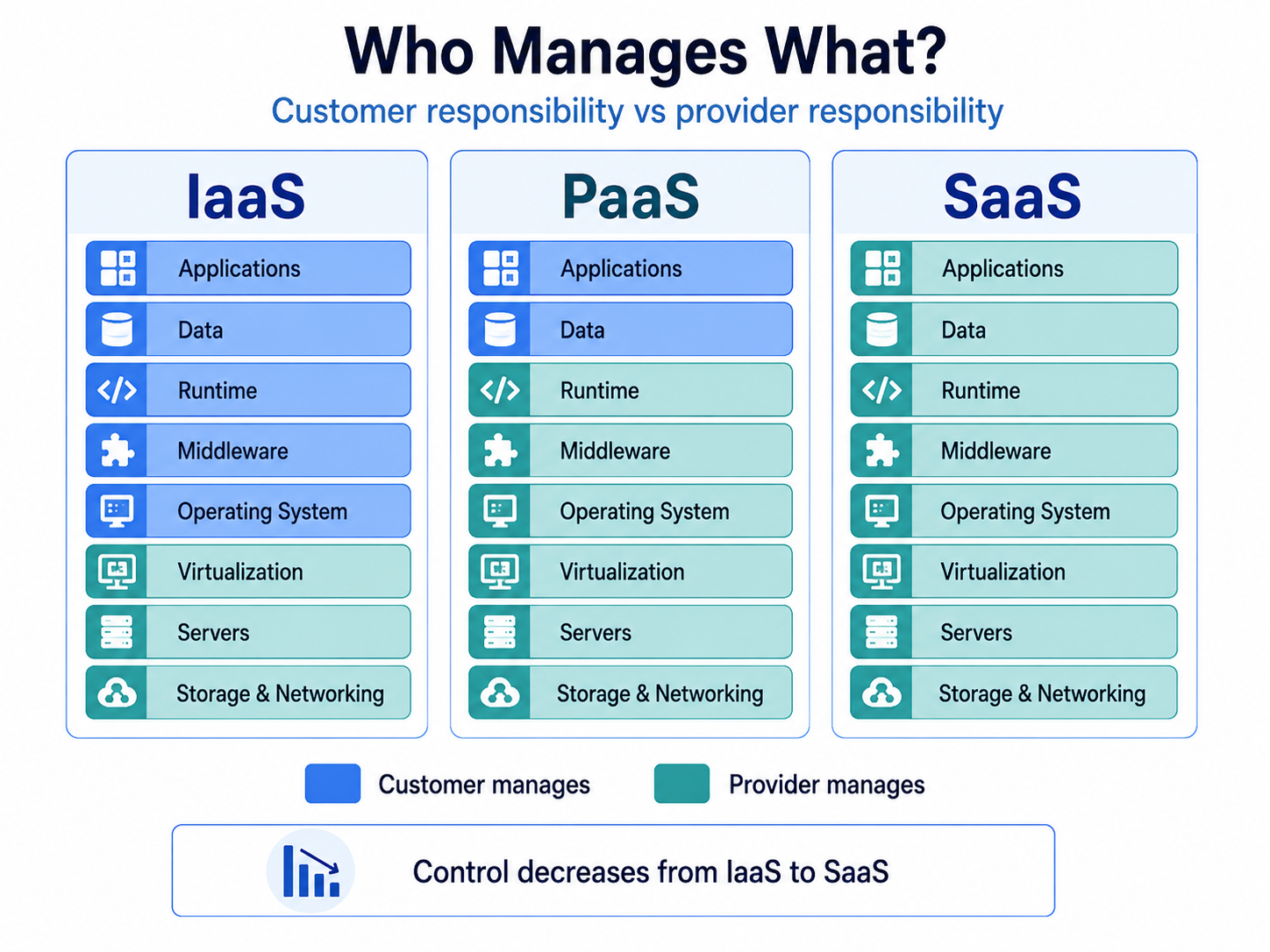
With IaaS, the cloud provider manages the physical data centres, hardware, networking, and core infrastructure. However, the customer usually manages the operating system, applications, data, runtime, and security settings.
IaaS is useful when a business wants more control without buying physical servers. It supports flexible infrastructure that can be scaled based on demand.
What Is IaaS in Cloud Computing?
IaaS in cloud computing means using infrastructure resources through a cloud provider instead of owning and maintaining them physically. These resources may include compute power, storage, virtual networks, load balancers, and backup systems.
For example, a company that needs servers to host an application can use IaaS cloud resources instead of setting up physical servers in an office or data centre. The company can increase or reduce capacity depending on traffic and workload needs.
Infrastructure as a service in cloud computing is commonly used by businesses that need flexibility, control, and scalability. It is also useful for teams that want to create testing environments quickly without long hardware setup times.
How IaaS Services Are Used
IaaS services are used when organisations need cloud infrastructure but still want control over operating systems, applications, and configurations.
Common uses include:
- Hosting websites and applications: Businesses can run websites, web apps, and backend systems on virtual servers.
- Storage and backup: Teams can store files, databases, and backups in the cloud.
- Testing and development: Developers can create temporary environments without buying new hardware.
- Disaster recovery: Companies can recover systems faster during outages.
- Scaling workloads: Resources can be increased or reduced based on demand.
As a result, IaaS works well for organisations that need flexibility but still have the technical skills to manage their environment.
Common IaaS Service Providers
Common IaaS service providers include Amazon Web Services, Microsoft Azure, Google Cloud, IBM Cloud, and Oracle Cloud. These providers offer infrastructure resources such as virtual machines, storage, networking, and cloud security tools.
For example, Amazon EC2 and Azure Virtual Machines are commonly used IaaS examples. Google Cloud infrastructure also provides compute, storage, and networking services that help businesses run workloads in the cloud.
The main point is simple: with IaaS, the provider gives the infrastructure, but the customer still manages many parts of the system.
Advantages and Disadvantages of IaaS in Cloud Computing
The advantages and disadvantages of IaaS in cloud computing depend on how much control and responsibility a business wants.
Advantages of IaaS | Disadvantages of IaaS |
High flexibility and control | Requires technical knowledge |
Easy to scale resources | Customer manages operating systems and applications |
No need to buy physical servers | Security configuration is partly the customer’s responsibility |
Useful for testing, hosting, and backup | Costs can increase if resources are not monitored |
The benefits of IaaS are strongest when a business needs control over infrastructure. However, it also needs skilled teams to manage systems, security, and costs properly.
What Is PaaS?
PaaS stands for Platform as a Service. It gives developers a ready platform to build, test, deploy, and manage applications without handling most of the underlying infrastructure.
With PaaS, the cloud provider manages servers, storage, networking, operating systems, middleware, and runtime environments. Developers can focus more on writing code and building applications.
In simple terms, PaaS sits between IaaS and SaaS. It gives more support than IaaS but more development control than SaaS.
What Is PaaS in Cloud Computing?
PaaS in cloud computing is a model where developers use a cloud-based platform to create applications. They do not need to manually manage servers, operating systems, or many backend resources.
For example, a development team can build and deploy a web application using a PaaS platform without setting up a server from scratch. The cloud provider handles much of the infrastructure layer in the background.
Platform as a service in cloud computing is especially useful for software development teams. It helps them build faster, test faster, and deploy applications with fewer infrastructure tasks.
How PaaS Services Are Used
PaaS services are mainly used by developers and application teams. They help reduce setup time and make application development more efficient.
Common uses include:
- Application development: Developers can build and test apps using ready-made tools.
- Web app deployment: Teams can deploy apps without manually managing servers.
- Database management: Some PaaS services include managed databases.
- API development: Developers can create and manage APIs more easily.
- DevOps workflows: Teams can automate testing, deployment, and updates.
Therefore, PaaS is useful when the goal is to build and launch applications without spending too much time on infrastructure management.
Common PaaS Providers
Common PaaS providers include Microsoft Azure, Google Cloud, AWS, Heroku, Red Hat OpenShift, and Salesforce Platform. These platforms give developers tools to build and deploy applications faster.
Examples include Azure App Service, Google App Engine, AWS Elastic Beanstalk, and Heroku. These services reduce the need to manage servers directly.
However, PaaS does not remove all responsibility. Developers still need to manage code, application logic, data, access controls, and application-level security.
Advantages and Disadvantages of PaaS in Cloud Computing
The advantages and disadvantages of PaaS in cloud computing are closely linked to speed and control.
Advantages of PaaS | Disadvantages of PaaS |
Faster application development | Less control over infrastructure |
Less server management | Possible platform limitations |
Useful developer tools | Vendor lock-in can become a concern |
Easier testing and deployment | Custom configurations may be restricted |
The benefits of PaaS are strongest for development teams that want to move quickly. However, it may not be the best option when a business needs deep control over the full infrastructure stack.
What Is SaaS?
SaaS stands for Software as a Service. It is a cloud service model where users access ready-to-use software through the internet.
With SaaS, the provider manages almost everything. This includes the infrastructure, platform, application, updates, security patches, and availability. The user mainly manages access, data usage, and basic settings.
SaaS is the easiest model for end users because it does not require server management, platform setup, or software installation.
What Is SaaS in Cloud Computing?
SaaS in cloud computing means software is delivered through the cloud instead of being installed and managed locally on every device.
For example, Gmail, Microsoft 365, Google Workspace, Salesforce, Dropbox, and Zoom are SaaS services. These tools work through the cloud, while the provider manages the backend systems.
Software as a service in cloud computing is common because it is simple, accessible, and easy to scale across teams. It is widely used by businesses, schools, individuals, and enterprises.
How SaaS Services Are Used
SaaS services are used for everyday business and personal tasks. These tools are usually accessed through a browser, mobile app, or desktop app connected to the cloud.
Common uses include:
- Email and communication: Gmail, Outlook, and Slack.
- Collaboration: Google Workspace, Microsoft 365, and Notion.
- Customer relationship management: Salesforce and HubSpot.
- Video meetings: Zoom and Microsoft Teams.
- File storage: Dropbox, Google Drive, and OneDrive.
- Accounting and HR tools: Cloud-based finance and employee management software.
In the same way, many businesses use SaaS cloud tools because they are quick to start and easy to manage.
Common Software as a Service Companies
Common software as a service companies include Microsoft, Google, Salesforce, Adobe, Dropbox, Zoom, Slack, HubSpot, and Shopify.
These companies provide ready-to-use applications that users can access without managing backend infrastructure. For example, Salesforce provides CRM software, Google Workspace provides productivity tools, and Zoom provides video communication software.
For most users, SaaS is the most familiar cloud service model. It is one of the most common examples of cloud computing in daily life.
Advantages and Disadvantages of SaaS in Cloud Computing
The advantages and disadvantages of SaaS in cloud computing are mostly about simplicity, control, cost, and dependency.
Advantages of SaaS | Disadvantages of SaaS |
Easy to use and access | Less control over the software |
No installation required | Requires internet access |
Provider handles updates | Data is stored with the provider |
Works well for teams | Customisation may be limited |
The benefits of SaaS are strongest when users want convenience and fast access. However, businesses must still think about data privacy, access control, compliance, and vendor dependency.
Difference Between IaaS, PaaS, and SaaS
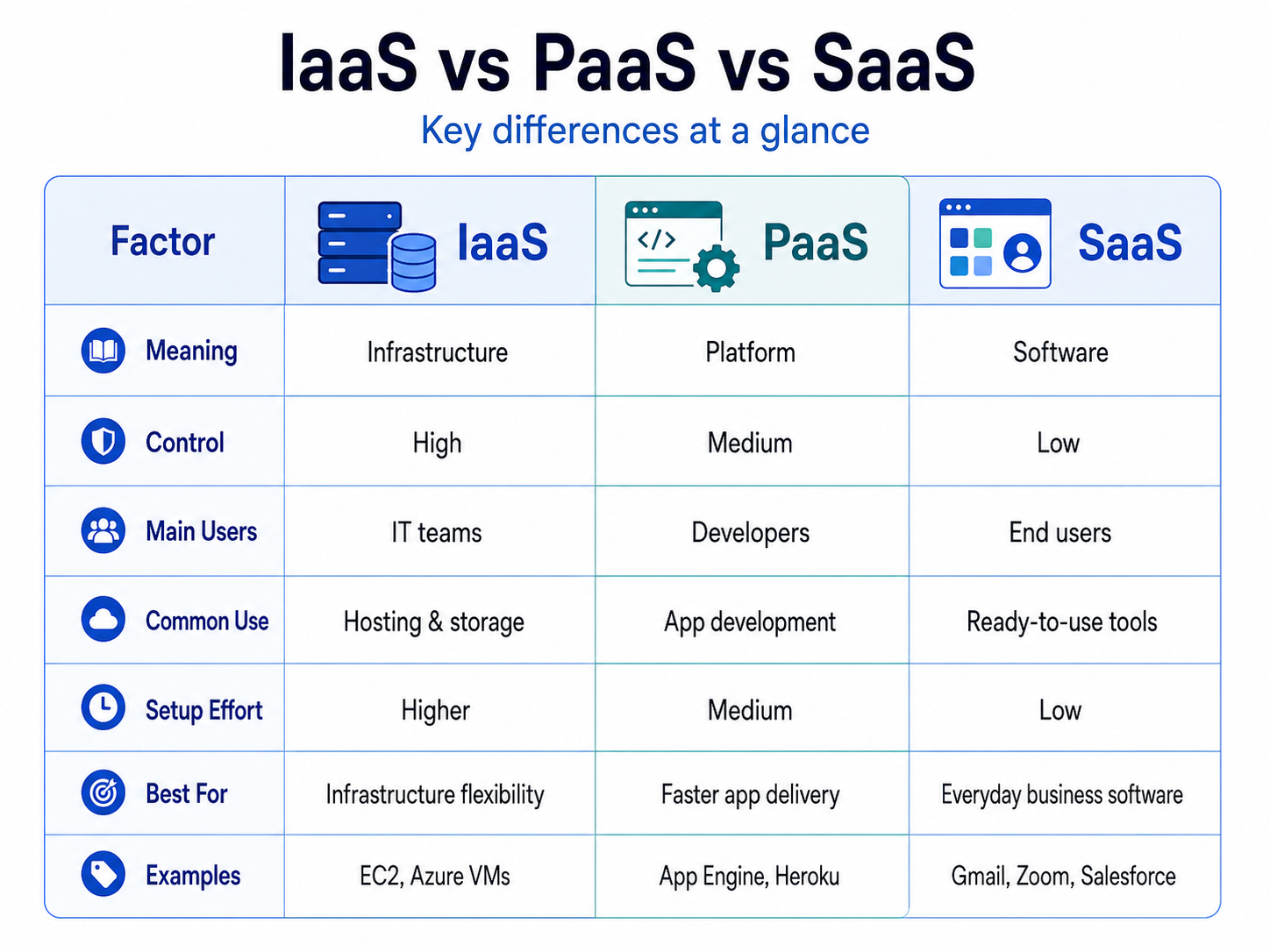
The main difference between IaaS, PaaS, and SaaS is the level of control and responsibility. IaaS gives the customer the most control. SaaS gives the provider the most responsibility. PaaS sits in the middle.
This is why cloud learners should not memorise only definitions. Instead, they should understand what each model gives, who uses it, and what the customer still manages.
Factor | IaaS | PaaS | SaaS |
Full Form | Infrastructure as a Service | Platform as a Service | Software as a Service |
Basic Meaning | Cloud infrastructure delivered over the internet | Cloud platform for building and deploying applications | Ready-to-use software delivered over the internet |
Main Purpose | Provides virtual servers, storage, networking, and infrastructure resources | Provides tools and environments for application development | Provides software that users can access directly |
User Control | High | Medium | Low |
Ease of Use | Requires technical knowledge | Easier for developers than managing infrastructure | Easiest for end users |
Provider Manages | Physical servers, storage, networking, data centres, and virtualisation | Infrastructure, operating system, middleware, runtime, and development environment | Infrastructure, platform, application, updates, security patches, and availability |
Customer Manages | Operating system, applications, data, runtime, security settings, and access control | Application code, data, users, access, and application-level settings | User accounts, access permissions, data usage, and basic settings |
Main Users | Cloud engineers, system administrators, IT teams, network teams | Developers, DevOps teams, software teams | End users, businesses, students, sales teams, HR teams, marketing teams |
Common Use Cases | Hosting websites, running virtual machines, storage, backup, testing, disaster recovery | Building apps, testing apps, deploying web applications, managing APIs, development workflows | Email, CRM, video meetings, file storage, collaboration, project management |
Setup Effort | Higher, because teams must configure and manage more | Medium, because the platform is already provided | Low, because the software is ready to use |
Customisation Level | High | Medium | Limited compared to IaaS and PaaS |
Scalability | Highly scalable, but needs proper setup and monitoring | Scalable for applications and development workloads | Scalable for users, teams, and subscriptions |
Security Responsibility | Shared, but the customer has more responsibility | Shared, with the provider managing more of the platform layer | Mostly handled by the provider, but users must manage access and data safely |
Cost Pattern | Usually based on infrastructure usage such as compute, storage, and bandwidth | Usually based on platform usage, app resources, or development needs | Usually subscription-based per user, team, or plan |
Best For | Businesses that need control over infrastructure | Developers who want to build and deploy apps faster | Users who want software without managing backend systems |
Not Ideal For | Non-technical users who only need ready software | Teams that need full infrastructure control | Businesses that need deep backend customisation |
Examples | Amazon EC2, Azure Virtual Machines, Google Compute Engine | Azure App Service, Google App Engine, AWS Elastic Beanstalk, Heroku | Gmail, Microsoft 365, Google Workspace, Salesforce, Dropbox, Zoom |
Simple Memory Hook | More system management | Build on a ready platform | Use the software directly |
In simple terms, IaaS is for managing infrastructure, PaaS is for building applications, and SaaS is for using software.
IaaS, PaaS, and SaaS Examples
IaaS, PaaS, and SaaS examples make the difference easier to understand because each model solves a different cloud need.
Model | Examples | Simple Explanation |
IaaS | Amazon EC2, Azure Virtual Machines, Google Compute Engine | Businesses rent cloud infrastructure and manage much of the system themselves. |
PaaS | Azure App Service, Google App Engine, AWS Elastic Beanstalk, Heroku | Developers build and deploy apps on a ready platform without managing most infrastructure. |
SaaS | Google Workspace, Microsoft 365, Salesforce, Dropbox, Zoom | Users access ready-made software through the cloud. |
For example, a company that wants control over servers and storage may choose IaaS. A developer who wants to deploy an app faster may choose PaaS. A team that only needs email, CRM, file sharing, or video meetings can use SaaS.
In simple terms, IaaS supports infrastructure, PaaS supports application development, and SaaS supports direct software usage.
Which Cloud Service Model Should You Choose?
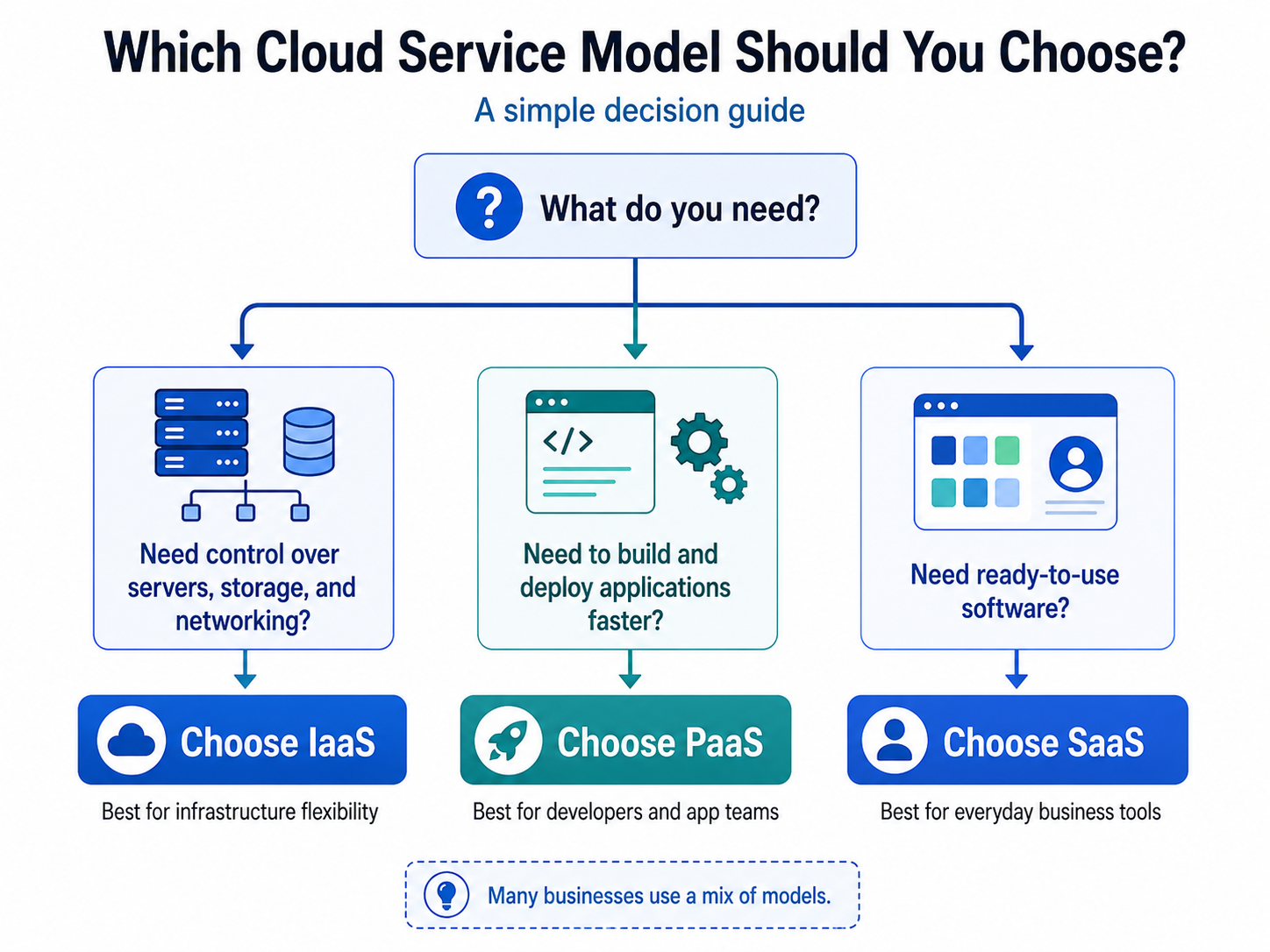
The right cloud service model depends on the task, team, and level of control required.
Choose IaaS when more control over servers, storage, networking, and system configuration is needed. It is useful for cloud engineers, IT teams, and businesses that need flexible infrastructure.
Choose PaaS when faster application development is the main goal. It is useful for developers who want to focus on code instead of managing servers and runtime environments.
Choose SaaS when ready-to-use software is enough. It is useful for individuals, teams, and companies that need tools for communication, productivity, sales, storage, design, or collaboration.
Choose This Model | When It Fits Best |
IaaS | Infrastructure control and flexibility |
PaaS | Faster application development |
SaaS | Ready-to-use software |
IaaS + PaaS | Infrastructure and development support |
PaaS + SaaS | Development tools and business software |
All three | A complete cloud-based business environment |
For learners preparing for AWS Cloud Practitioner, Azure Fundamentals, or Cloud+, this decision-making approach is important. Exams often test whether the right model can be identified based on responsibility, control, and use case.
Why IaaS PaaS SaaS in Cloud Computing Matter for Cloud Learners
IaaS PaaS SaaS in cloud computing are not just definitions to memorise. They help learners understand how cloud services are designed, delivered, managed, and used.
For AWS Cloud Practitioner, Azure Fundamentals, and Cloud+ preparation, this concept is important because exams often test responsibility, control, use cases, and examples.
The simplest way to remember it is this: IaaS gives infrastructure, PaaS gives a development platform, and SaaS gives software that can be used directly.
Once this is clear, many other cloud computing concepts become easier to learn.